
EP555 Game Download Latest Earning App In Pakistan 2026
2 Hours Ago
6.7 MB
V1.4.3
17,234

Description
The EP555 Game is a mobile gaming platform for users who enjoy playing different online games on their phones. It brings a range of gaming options together in one place making it easy for players to explore available games, create an account, and access the platform through their mobile devices.
If you are looking for the EP555 Game APK in Pakistan, our this guide will help you understand how to download and install the app, register an account, explore its features, and use the available account options. You will also find helpful information about deposits, withdrawals, common problems, and safe APK installation.
Before downloading, remember that game availability, account features, and payment options can change. Always check the details displayed in the app before using any financial feature.
What Is EP555 Game?
EP555 is a mobile gaming platform that allows users to access different games through one account. Instead of searching for each game separately, players can explore the available options inside the app.
The platform is designed for mobile users who want a convenient way to access games. Its main appeal is the combination of account access, game selection, and in-app features within a single interface.
Players can use EP555 Game to:
- Explore the games available in the app.
- Register a new account.
- Sign in to an existing account.
- Check account information and available features.
- Review the payment options provided in the app.
- Access customer support when help is needed.
The available games and features may differ by account, app version, or location. Check the current app interface for the latest information.

EP555 Game APK Details
Here is a quick overview of the EP555 Game APK.
| App Detail | Information |
|---|---|
| App Name | EP555 Game |
| App Type | Mobile gaming platform |
| Supported Device | Android phones & Desktop |
| Download Format | APK |
| Account Access | Registration and login |
| Version | V1.4.3 |
| APK size | 6.7 MB |
The exact APK version, file size, and update date can change when a new release becomes available. Check the download information before installing the app on your device.
EP555 Game Download for Android
You can download the EP555 Game APK to your Android phone and install it manually. APK installation is different from downloading an app through Google Play, so make sure you understand the installation steps before continuing.
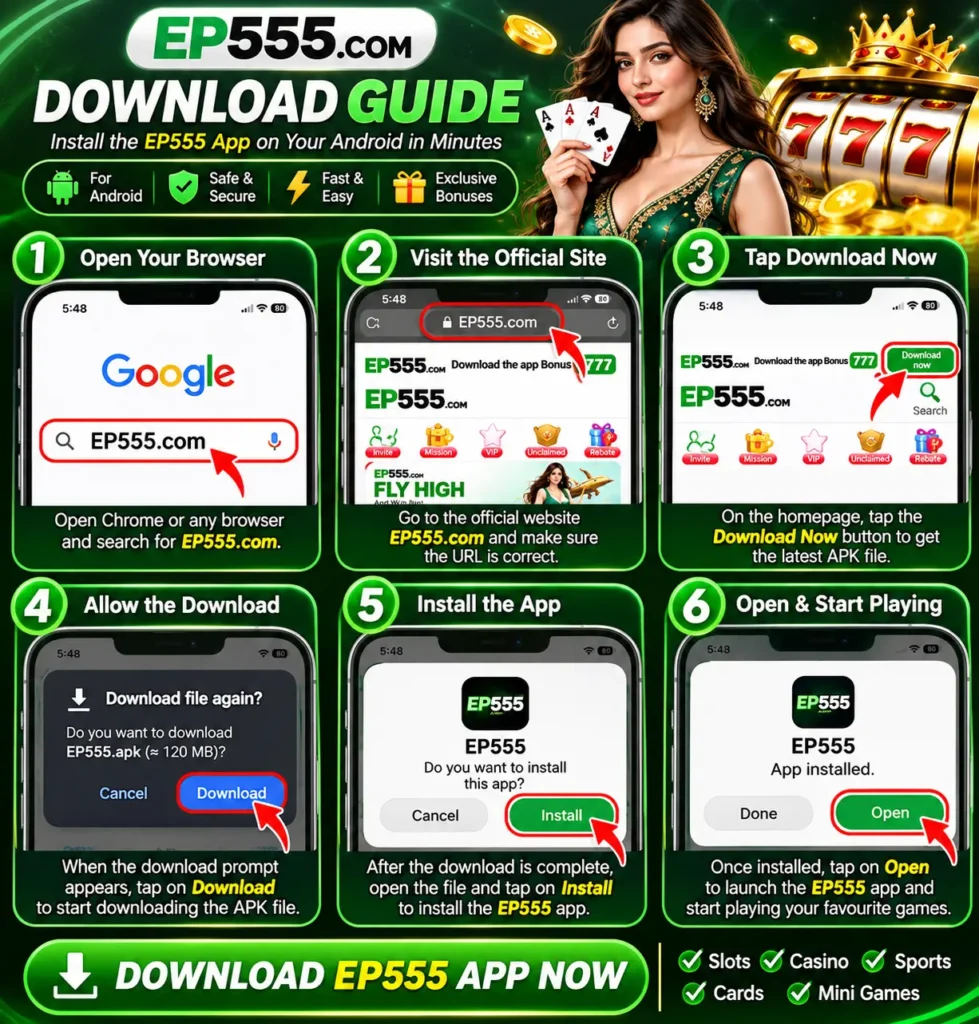
How to Download EP555 Game APK
Follow these steps to download the app:
- Open the EP555 Game download page on your Android phone.
- Find the APK download option.
- Tap the download button.
- Wait for the APK file to finish downloading.
- Open your phone’s Downloads folder.
- Tap the downloaded EP555 Game APK file.
- Continue with the installation instructions on your screen.
If Android blocks the installation, your phone may ask you to allow installation from that source. Only enable this permission if you trust the source of the APK. You can turn the permission off again after installation.
You can always trust APKLATESTGAMES.COM for safe APK downloads. also play Done999 Game and enjoy real cash.
How to Install EP555 Game APK
Once the APK file is downloaded, install it by following these steps:
- Open File Manager on your Android phone.
- Go to the Downloads folder.
- Find the EP555 Game APK file.
- Tap the file to start installation.
- If prompted, allow installation from the relevant source.
- Tap Install.
- Wait until the installation is complete.
- Open EP555 Game from your phone’s app menu.
If the installation fails, check whether your phone has enough storage space and whether the APK file downloaded completely. Avoid downloading multiple APK files from unknown websites to solve the problem.
How to Register on EP555 Game
New users need to create an account before accessing account-based features. Registration usually requires basic information and the creation of login details.
EP555 Game Registration Steps
- Open the EP555 Game app.
- Tap the Register or Sign Up option.
- Enter the information requested on the registration screen.
- Create a password.
- Enter a referral code if you have one and the app provides a referral field.
- Review the information you entered.
- Submit the registration form.
- Follow any additional verification instructions shown in the app.
Use information you can access and keep your login details private. Do not share your password or verification codes with another person.
EP555 Game Login
If you already have an account, you can sign in without registering again.
- Open EP555 Game.
- Select Login.
- Enter your registered account details.
- Type your password carefully.
- Tap the login button.
If you cannot access your account, check your login information first. If the app provides a password recovery option, follow its instructions. Contact support through the app if the issue continues.
Features of EP555 Game
EP555 Game includes several features intended to make mobile gaming and account access easier. The exact options available depend on the current app version.
Different Games in One App
EP555 Game gives users access to a selection of games through a single platform. Players can explore the available categories and choose a game according to their interests.
The game selection may change over time, so check the app for the current list.
Mobile-Friendly Interface
The app is designed for use on Android devices. Its interface allows users to navigate between account options and the available games using their phone.
A stable internet connection may be required to access online features.
Account Registration and Login
Users can create an account and return to it through the login option. Keeping your account details secure is important, especially if the app includes account balances or payment-related features.
In-App Account Options
The app may provide account-related features such as profile information, transaction records, or other settings. Review the options available in your account to understand what you can manage.
Promotions and Rewards
Promotional offers may be available to eligible users. Each offer can have its own conditions, such as eligibility requirements, usage limits, or withdrawal restrictions.
Read the terms before accepting a promotion. Do not assume that a bonus is automatically withdrawable or that it guarantees a return.
Customer Support
If you experience a login, installation, or account issue, look for the support option inside the app. When contacting support, explain the problem clearly and include relevant details, but never share your password or private verification codes.
Games Available on EP555 Game
EP555 Game provides access to a selection of mobile games. The games available to you may depend on the current app version and your account.
You can explore the game section after signing in. Check each game’s instructions before playing so you understand its rules, controls, and any conditions that apply.
Explore the Available Games
The app’s game lobby is the best place to view the current selection. You may find different game styles and categories depending on the version you are using.
Before starting a game:
- Read the instructions.
- Check whether the game uses points, credits, or another in-app balance.
- Review any entry conditions.
- Understand whether the activity involves real money.
- Set personal limits before playing.
The available game titles can change, so use the current in-app list rather than relying on an old list of games.
EP555 Game Deposit Guide
If the app offers deposits, the payment process and supported methods will be displayed in its account or wallet section. Payment options can vary, so check the current instructions before making a transaction.
How to Make a Deposit
- Open EP555 Game and sign in.
- Go to the wallet, balance, or deposit section.
- Review the available payment methods. e.g Easypaisa, Jazzcash
- Select a method shown in your account.
- Enter the amount, if required.
- Check the transaction details carefully.
- Follow the payment instructions.
- Return to the app and check your account balance or transaction history.
Do not send money to a personal account or payment number unless you have verified that it is an authorized payment method. Keep your transaction receipt until the payment is reflected in your account.
Deposit Not Showing?
If a deposit does not appear, avoid making another payment immediately. First:
- Check whether the transaction was completed.
- Review your payment app or bank record.
- Check the transaction history in EP555 Game.
- Wait for the processing period stated in the app.
- Contact support with the transaction reference if the balance remains unchanged.
Never share your banking password, PIN, or one-time verification code with customer support or another user.
EP555 Game Withdrawal Guide
If withdrawal functionality is available, the app should provide instructions for requesting a payout. Before submitting a request, check the minimum amount, available payment methods, verification requirements, and any applicable conditions.
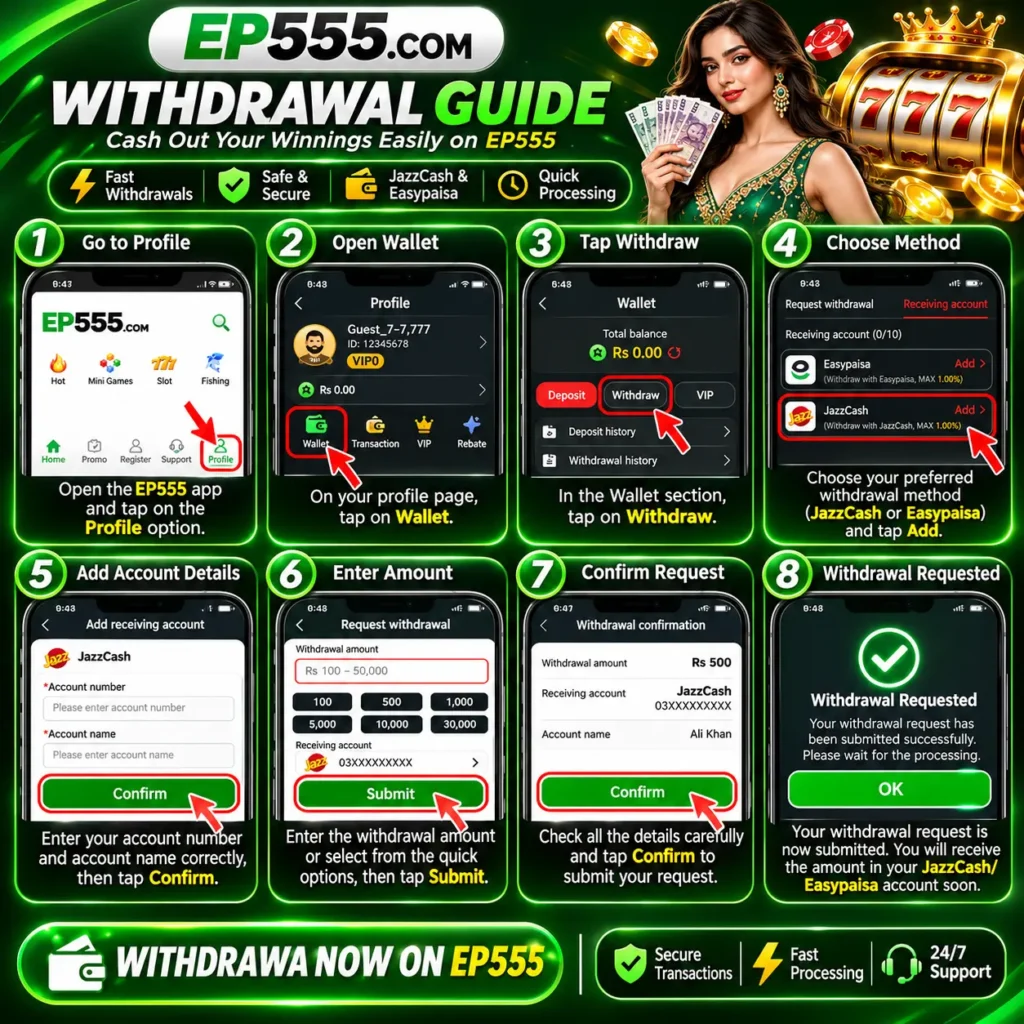
How to Request a Withdrawal
- Sign in to your EP555 Game account.
- Open the wallet or withdrawal section.
- Review the withdrawal methods available to you e.g Easypaisa, Jazzcash
- Select the method you want to use.
- Enter the required details.
- Check the amount and recipient information.
- Submit the withdrawal request.
- Save the request or transaction reference.
- Check the status in your account.
Withdrawal processing times can vary. A request may also require account verification or review. Use the app’s stated conditions to understand the process.
Withdrawal Problems
If a withdrawal is delayed or rejected, check the following:
- Whether your account has completed the required verification.
- Whether the withdrawal details are correct.
- Whether your request meets the stated minimum or other conditions.
- Whether the app shows a pending or rejected status.
- Whether support has provided a specific reason.
Do not pay an unexpected “release fee” to an individual who claims they can unlock your withdrawal. Verify any payment requirement through the app’s official support channels.
EP555 Game Bonuses and Promotions
EP555 Game may offer promotional rewards or bonuses to eligible users. The terms of each offer matter more than the advertised amount.
Before accepting a promotion, check:
- Who is eligible.
- Whether a minimum deposit is required.
- Whether the offer has a usage limit.
- Whether the bonus can be withdrawn.
- Whether a turnover or playthrough condition applies.
- When the offer expires.
A promotion is not a guaranteed profit. Make sure you understand its conditions before participating.
Is EP555 Game Safe to Download?
Your device and personal information should always come first when installing an APK.
Before installing EP555 Game, take these precautions:
- Download the APK from a source you trust.
- Check the app name and file details before installation.
- Review the permissions requested by the app.
- Avoid granting permissions that are unrelated to its function.
- Keep Android and your security software updated.
- Do not share passwords, PINs, or verification codes.
- Avoid using the same password for multiple accounts.
An APK file is not automatically safe simply because it installs successfully. If your phone displays a security warning, take it seriously and verify the file before proceeding.
EP555 Game: Important Things to Know
Before using EP555 Game, keep these points in mind.
- Games, account features, and payment methods may change with app updates.
- Review the rules for any game, promotion, deposit, or withdrawal before using it.
- Keep your password and verification codes private.
- If a feature involves real-money deposits or withdrawals, understand the risks and set a limit you can afford to lose.
- Make sure your use of the app complies with applicable laws and regulations in your location.
Common EP555 Game Problems and Solutions
Here are some common issues users may experience while installing or using the app.
EP555 Game APK Is Not Installing
Try these steps:
- Make sure the APK download is complete.
- Check that your phone has enough storage.
- Confirm that you are using a compatible Android device.
- Allow installation from the source you selected, if you trust it.
- Remove an incomplete download and download the file again from a trusted source.
EP555 Game Is Not Opening
If the app does not open:
- Restart your phone.
- Check your internet connection.
- Make sure you are using the latest available app version.
- Clear the app cache through Android settings.
- Reinstall the app only if you can access a trusted APK source.
Login Is Not Working
Check that you entered the correct account details. Make sure Caps Lock or keyboard settings are not affecting your password. If you forgot your password, use the recovery option if available.
Game Is Loading Slowly
A slow connection may affect online games. Try switching between Wi-Fi and mobile data, closing other apps, and restarting the game. If the issue continues, check whether the app provides a support option.
Deposit or Withdrawal Is Pending
Review the transaction status and payment record before taking further action. Keep your transaction reference and contact support through the app if the transaction remains unresolved.
Conclusion
EP555 Game offers Android users a way to explore different games through one mobile platform. If you want to try it, start by checking the available games and features, then follow the download and installation steps in this guide.
Before using account or payment features, read the conditions carefully and protect your personal information. Download the APK only from a source you trust, and make informed decisions whenever a game involves money.
Frequently Asked Questions About EP555 Game
What is EP555 Game?
EP555 Game is a mobile gaming platform that allows users to access a selection of games and account features through an Android app.
How can I download EP555 Game APK?
Open the EP555 Game download page on your Android phone, download the APK file, and install it through your Downloads folder. Only install APK files from sources you trust.
Is EP555 Game available for Android?
EP555 Game is accessed through an Android APK. Device compatibility can depend on the app version and your phone’s software.
How do I register on EP555 Game?
Open the app, select Register or Sign Up, enter the requested details, create a password, and follow the instructions on the screen.
How do I log in to EP555 Game?
Open the app, tap Login, and enter your registered account details.
Can I use EP555 Game in Pakistan?
Availability and access can change. Check the app’s current terms and make sure your use complies with applicable local laws.
How do I deposit money in EP555 Game?
If deposits are available, open the wallet or deposit section and follow the payment instructions shown in your account. Verify the payment details before sending money.
How do I withdraw from EP555 Game?
If withdrawals are available, open the withdrawal section, review the requirements, enter the requested details, and submit your request. Processing times and conditions may vary.
What should I do if EP555 Game is not working?
Check your internet connection, restart your phone, and make sure the app is updated. For account or transaction problems, use the support option provided in the app.
Is EP555 Game safe?
Safety depends on the APK source, app permissions, account practices, and how you use the platform. Download carefully, review permissions, and never share your private account information.