
999YO Game APK Download | Enjoy Latest Earning Game 2026
56 Minutes Ago
7 MB
V2.6.1
Android 5+
31,812

Description
Want to explore a new mobile gaming app on your Android phone? 999YO Game is attracting attention from users in Pakistan who are looking for card games, online entertainment, and a convenient way to access games from their smartphones. Before downloading the app, it is worth knowing what it offers, how to install it, and what to check when setting up an account.
This guide takes you through the essentials of 999YO Game, from its main features and game categories to APK installation, registration, login, and payment information. You will also find practical tips for protecting your account and understanding the conditions attached to any promotional offer.
Whether you are learning about 999YO Game for the first time or looking for help getting started on Android, this guide gives you the information you need to explore the app more carefully. Read on before installing, registering, or using any payment feature.

What Is the 999YO Game?
999YO Game is an online mobile gaming platform that users may explore for card games and other forms of digital entertainment. It is designed around mobile access, allowing users to open the application on a compatible device and navigate its available sections.
The platform is searched for by users in Pakistan who want to learn about Android gaming apps. Its name is also used in searches related to APK downloads, registration, account access, and payment features.
Before downloading an application, it is important to identify the correct app and its source. Similar names can appear across different websites, and an APK file shared by an unknown source may not be the application you intended to install.
A useful starting point is to check the app name, developer details, version information, permissions, and terms of service. If these details are missing or unclear, take time to verify the source before proceeding.
999YO Game App Information
The following table gives a simple overview of the information users should check before installing 999YO Game.
| App Detail | Information |
|---|---|
| App name | 999YO Game |
| App category | Online mobile gaming and entertainment |
| Intended device | Android phones, if a compatible Android version is available |
| Download format | APK |
| Main search audience | Users looking for 999YO Game in Pakistan |
| Game categories | Check the current in-app game lobby |
| Account access | Review the registration and login options available in the app |
| Payment features | Easypaisa, Jazzcash, Bank transfers, crypto |
| APK size | 7 MB |
| Current version | V2.6.1 |
This information is intended as a quick reference. Check the current application details before downloading, especially if a website displays a version number, file size, or developer name that you cannot verify.
Top Features of 999YO Game
A mobile gaming platform should be easy to understand and simple to navigate. When exploring 999YO Game, pay attention to the following features and sections.
Multiple Game Categories
Online gaming platforms may bring several types of games into one application. Card games are an important search category for 999YO Game, while other game types may be available through its game lobby.
The exact selection can depend on the current app version and the services available to the user. Open the game lobby to review the titles and their instructions before choosing a game.
A good way to explore a new game is to read its rules first. This can help you understand how a round works, what the available controls do, and whether the game involves any financial risk.
Mobile-Friendly Interface
A mobile-friendly interface helps users navigate an app on a smaller screen. Clear menus, readable text, and well-organized sections can make it easier to find the game lobby, account information, and settings.
When opening 999YO Game, take a moment to explore the interface. Look for the main menu, account section, help options, and any available game instructions.
Avoid tapping unfamiliar buttons quickly, particularly if they lead to a payment screen or ask you to provide personal information.
Simple Navigation
Navigation is an important part of the mobile experience. Users should be able to move between the available sections without confusion.
When reviewing the app, check whether you can easily locate:
- The main game lobby
- Account registration and login
- Profile or account settings
- Game instructions
- Payment information, if available
- Promotions and offer conditions
- Help or support options
Knowing where these sections are located can make the app easier to use. If an important section is difficult to find, review the app’s help information before continuing.
Account Management
Account management features help users access their profile and review account-related information. If 999YO Game provides an account section, check the details it displays and the options available for updating or recovering your account.
Use a strong password that you do not use on other websites or apps. Never share your password, account PIN, or one-time verification code with another person.
If you need to recover your account, use the recovery method provided within the application or through a verified support channel. Avoid third-party services that claim they can recover accounts in exchange for your login details.
Game Information
Game instructions are useful when trying a new title. Before starting, check the rules, controls, and any conditions that apply to the game.
If the app includes a help section for individual games, read it before playing. Understanding the rules can help you avoid confusion and make better decisions about whether the game is suitable for you.
Do not assume that every game works in the same way. Different titles may use different controls, scoring methods, or round structures.
Application Updates
App updates may include changes to the interface, fixes, or other adjustments. If you use an APK, make sure any update comes from a source you can verify.
Avoid installing a new version simply because a third-party page labels it as “latest.” Check the app name, developer, version details, and source before updating.
If an update asks for permissions that seem unrelated to the app’s purpose, stop and review the request. Do not ignore unexpected security warnings.
Transaction Section
Some online gaming platforms include a transaction or wallet section. If 999YO Game provides one, read its terms carefully before making a payment.
Look for details such as:
- Available payment methods
- Minimum and maximum transaction limits
- Any service fees
- Deposit conditions
- Withdrawal requirements
- Processing information
- Support options for transaction issues
Do not assume that a payment method is supported just because it is popular in Pakistan. Check the actual payment options displayed in the app before sending money.
Online Entertainment
Mobile gaming can provide entertainment, but it should not be treated as a dependable source of income. If a game involves real-money transactions, users may lose money.
Set a limit before using any paid feature. Do not use money intended for education, food, rent, bills, or other essential expenses. If you feel pressured to continue playing or to recover a loss, stop and take a break.
Android Accessibility
Android users often look for APK files when an application is not available through their usual app store. An APK is an Android installation file, but downloading one from an unknown website can create security risks.
Before installing 999YO Game, confirm that the app is intended for your device and Android version. Review the requested permissions and avoid modified APKs that claim to unlock special features or provide guaranteed rewards.
How to Download 999YO Game APK
If you are looking for the 999YO Game APK download, begin by verified source e.g APKLATESTGAMES.COM . Downloading an application from an unfamiliar website can expose your device to unwanted software or data risks.
Follow these general steps only when you have identified a trustworthy source:
- Open the verified website or app distribution page.
- Find the Android download section.
- Check the application name and developer information.
- Review the displayed version and file details.
- Download the APK only if you trust the source.
- Locate the downloaded file in your phone’s Downloads folder.
- Review the installation prompt before continuing.
If the download page does not provide clear developer or application information, do not proceed. A professional-looking website does not automatically mean that an APK is safe.
What to Check Before Downloading
Before downloading any APK, review these details:
- App name: Make sure the name matches the application you are looking for.
- Developer: Look for clear developer or publisher information.
- Version: Check whether the version details are available and consistent.
- File source: Use a trusted distribution source rather than a random file-sharing link.
- Permissions: Consider whether the requested access is necessary.
- Privacy policy: Read how the app may collect and use your information.
- Terms: Review any conditions that apply to account use or payments.
If these details are missing, unclear, or inconsistent, it is safer not to install the file.
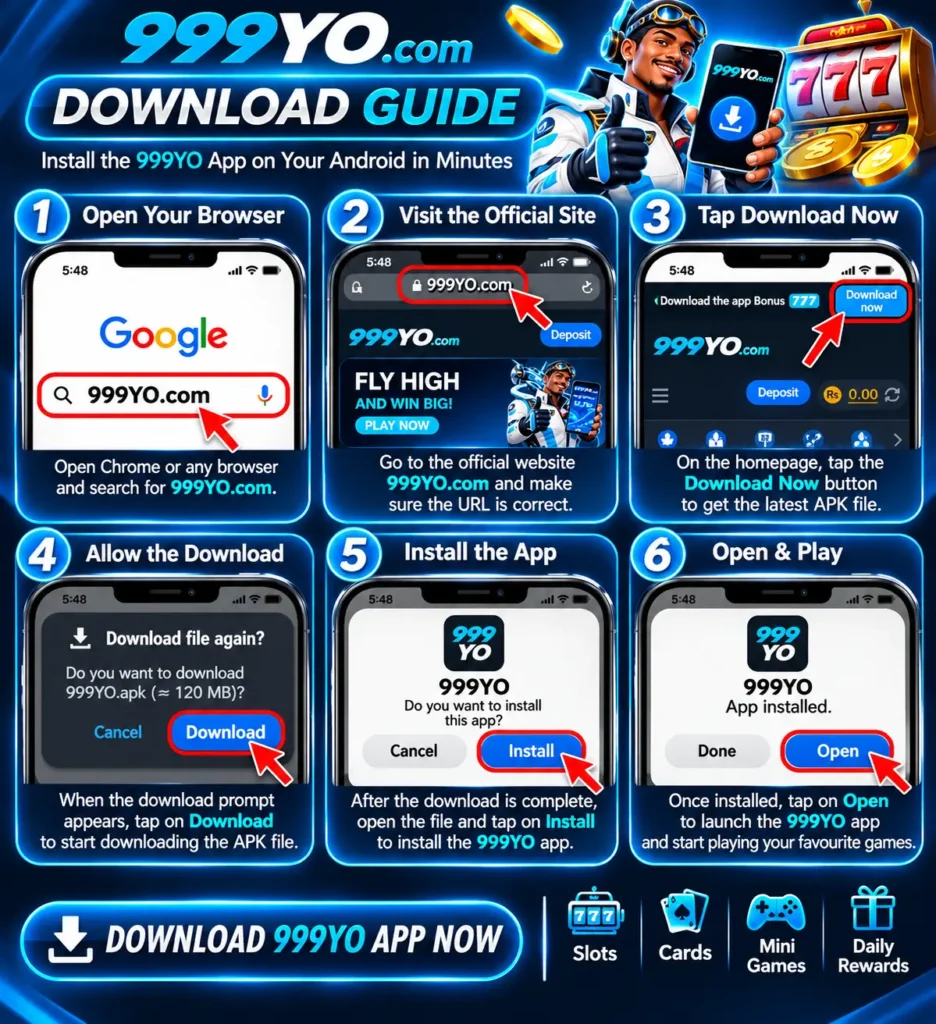
How to Install 999YO Game on Android
Android installation steps can differ slightly between phone brands and operating system versions. If you have downloaded a verified APK, use the following general process.
Step 1: Find the APK File
Open your phone’s file manager and go to the Downloads folder. Locate the APK file you downloaded.
Check its name and source before opening it. If the file has a different name from the application you intended to download, do not install it.
Step 2: Open the Installation Prompt
Tap the APK file. Android may display an installation screen with the app name and requested permissions.
Read the information carefully. If the app requests access that does not appear necessary for its purpose, stop and investigate before continuing.
Step 3: Review Android’s Security Setting
Android may ask whether you want to allow installation from the source you are using. This setting can vary depending on your phone and Android version.
Only allow installation if you trust the source. Do not enable unknown-source installation for every application or leave permissions enabled unnecessarily.
Step 4: Complete Installation
If the app and source are verified and the permissions appear appropriate, follow the on-screen instructions to complete the installation.
Once installed, open the app and review its privacy information, terms, and account options before entering personal details.
Step 5: Check the App
After installation, make sure the app opens normally and displays the expected name and interface. If it shows unexpected pop-ups, requests unrelated permissions, or behaves suspiciously, close it and remove it from your device.
Do not install another APK from a different unknown website just because the first file does not work.
How to Create an Account on 999YO Game
The registration options can depend on the application version and services available to the user. If 999YO Game provides an account registration option, follow the instructions displayed in the app.
Before creating an account, review its terms and privacy policy. Make sure you understand what information is required and how it may be used.
A general registration process may involve the following steps:
- Open the application.
- Find the registration or sign-up option.
- Review the information requested by the app.
- Enter only the details required for registration.
- Create a strong, unique password if the app asks for one.
- Complete any verification process provided by the application.
- Read the account terms before finishing.
Do not use another person’s identity or provide false information. If you are unsure why the app requests a particular detail, check its privacy policy or support information first.
Tips for Account Security
Account security matters whenever an app stores personal information.
- Use a unique password.
- Keep your login details private.
- Never share an OTP or verification code.
- Avoid logging in through links sent by unknown people.
- Use the official account recovery process.
- Review account activity if the app provides that option.
If someone contacts you and asks for your password or verification code, do not provide it.
999YO Game Login Guide
If you already have an account, use the login option available in the application. Enter your registered account details carefully and avoid using login pages shared by unknown sources.
If you cannot log in, try these basic checks:
- Confirm that you have opened the correct application.
- Check your internet connection.
- Review the username, phone number, or other login detail you entered.
- Check whether the app provides a password recovery option.
- Update the application only through a verified source.
- Contact support through a channel you can verify, if one is available.
Do not repeatedly enter your details on a page that looks unfamiliar. If you believe your account may be compromised, stop using it and follow the account security or recovery instructions.
Bonuses and Promotions of 999YO Game
Promotions can be one reason users search for gaming apps, but an offer should always be reviewed carefully. If 999YO Game displays a bonus, reward, or referral offer, read the full conditions before participating.
A promotion may have requirements such as:
- A qualifying action
- An eligibility condition
- An expiry date
- A limit on how often it can be used
- A requirement to complete certain steps
- Restrictions on using or withdrawing a reward
Do not assume that a displayed bonus is cash that can be withdrawn immediately. The terms may explain how the offer works and what conditions apply.

Registration Offers
A registration offer, if available, may be linked to creating an account or completing a required step. Read the terms to understand whether the offer is available to all users and whether any additional conditions apply.
Avoid creating multiple accounts to claim the same offer. This may violate the platform’s terms and could affect account access.
Deposit Offers
A deposit promotion may require a qualifying transaction. Before making a payment, check the minimum amount, eligibility conditions, expiry date, and any restrictions.
Do not deposit money only because a promotion is advertised. Consider whether you are comfortable with the financial risk and whether the terms are clear.
Referral Offers
A referral offer may involve sharing an invitation link or code. If the app provides this feature, read its rules before inviting other people.
Be honest when explaining an app to friends. Do not promise guaranteed earnings or suggest that a referral reward is certain unless the official terms clearly support that statement.
Daily or Limited-Time Promotions
Some apps display offers for a limited period. Check the expiry time and eligibility conditions before participating.
Do not rush into a payment or account action because an offer is described as urgent. A genuine offer should have clear terms that users can review.
Deposit Process on 999YO Game
The availability of deposits and the supported payment methods for 999YO Game should be confirmed directly in the application. Do not assume that a specific bank, mobile wallet, or payment service is supported.
If the app includes a deposit section, use the following checklist before making a transaction.
Step 1: Open the Payment Section
Open the application and locate its wallet, balance, or payment section, if one is available.
Review the information shown on the screen. Make sure you understand what the transaction is for before continuing.
Step 2: Review the Available Methods
Check which payment methods are displayed. If you are in Pakistan, you may be familiar with services such as JazzCash or Easypaisa, but their availability must be confirmed in the app itself.
Do not send money to a personal account or number provided through an unofficial message.
Step 3: Check the Transaction Conditions
Before confirming a payment, review:
- The amount you are sending
- Any minimum or maximum limit
- Any transaction fee
- The payment recipient
- The platform’s terms
- The process for reporting a failed transaction
If any information is unclear, do not proceed until you can verify it.
Step 4: Keep the Transaction Record
If you decide to make a payment, keep the receipt or transaction reference provided by your payment service.
Never share your mobile wallet PIN, banking password, or OTP with another person. A payment support representative should not need your private security code.
Step 5: Check the Account Balance
If the app provides a balance or transaction history, review it after the payment. If the transaction does not appear, use a verified support channel and provide only the necessary transaction reference.
Do not make repeated payments to fix a transaction that appears to be pending or failed.
Withdrawal Process on 999YO Game
Withdrawal availability and requirements should be confirmed through the app’s own payment information. Do not assume that a withdrawal is guaranteed or that a specific processing time applies.
If a withdrawal option is available, review the following points before submitting a request.
Step 1: Check the Withdrawal Rules
Read the conditions for withdrawals. Look for minimum amounts, account verification requirements, fees, and any restrictions.
If the terms are not clear, avoid submitting a request until you understand them.
Step 2: Review the Available Methods
Check which withdrawal methods are displayed in the app. Do not rely on a third-party article or social media post to confirm that a payment service is supported.
Use only payment details that belong to you and that you have checked carefully.
Step 3: Confirm the Amount
Review the amount you intend to request. Make sure it meets any stated requirements and that you understand any fee or deduction.
Step 4: Submit the Request
If the app provides a withdrawal form, follow the instructions shown on the screen. Review all information before submitting.
Keep any confirmation number or transaction reference provided by the app.
Step 5: Track the Request
If a transaction history or status page is available, use it to review the request. If you need help, contact support through a channel you can verify.
Be cautious if someone asks you to pay an additional, unexplained amount to release a withdrawal. Do not send extra money without verifying the request and understanding the terms.
Tips and Tricks for Using 999YO Game
If you decide to explore 999YO Game, these practical tips can help you use the app more carefully.
Read the Rules Before Playing
Each game may have its own instructions and controls. Read the rules before starting rather than assuming that a familiar game works the same way in every app.
Explore the Interface First
Take time to understand the main menu, game lobby, account settings, and help section. This can help you avoid accidentally selecting a payment or account option.
Set a Personal Limit
If a game involves real-money transactions, decide in advance how much you are willing to spend. Do not use essential funds, borrow money to play, or continue trying to recover a loss.
Review Offers Carefully
Read the terms of any promotion before participating. Check whether an offer has an expiry date, qualifying requirement, or restriction.
Protect Your Account
Use a unique password and keep verification codes private. Avoid using public or shared devices for account access.
Keep Your Device Secure
Download apps only from sources you can verify. Review permissions, keep Android updated, and remove applications that behave unexpectedly.
Take Breaks
Gaming should remain a form of entertainment. Take breaks and stop if you feel pressured to keep playing or spend more money.
Pros and Cons of 999YO Game
The following overview highlights factors users should consider when evaluating 999YO Game. It is not a hands-on test or a guarantee of the app’s current features.
Pros
- It is associated with mobile gaming and entertainment searches.
- An Android app may provide convenient access on a compatible phone.
- A platform with a clear game lobby can make it easier to explore available titles.
- Account and help sections, where available, can support basic app navigation.
- A single app may organize multiple game categories.
Cons
- The developer and official distribution source should be verified.
- The exact game selection may depend on the current app version.
- Payment methods and withdrawal conditions need to be checked directly.
- Installing APK files from unknown sources can create security risks.
- Promotions may include restrictions and eligibility requirements.
- Real-money gaming can lead to financial loss.
Honest Review of 999YO Game
999YO Game is a name users may encounter when searching for Android gaming apps in Pakistan. Its main appeal is its association with mobile entertainment and card-game searches.
However, a user should not judge an application only by its name, download page, or promotional message. The developer, app source, privacy policy, available features, and terms are important parts of the decision.
A useful app should provide clear information about its ownership, account requirements, and any payment conditions. Users should be able to understand what they are installing and what information they are being asked to provide.
If you are considering 999YO Game, start by checking the application’s source and reviewing its available sections. Do not make a payment before confirming the transaction rules. If the app’s developer or support information is unclear, it is safer to avoid sharing personal or financial details.
Most importantly, do not treat real-money gaming as a dependable way to earn income. No game can guarantee that you will make money, and any money spent may be lost.
Responsible Gaming Disclaimer
Online gaming can involve financial risk, particularly when an app includes paid features or real-money transactions.
Keep these points in mind:
- Do not treat gaming as a source of regular income.
- Do not spend money needed for essential expenses.
- Do not borrow money to play.
- Do not chase losses by making additional payments.
- Read the app’s terms before using any paid feature.
- Stop if gaming begins to affect your finances, studies, work, or relationships.
You should also check whether the app and its features are lawful and appropriate for your location. If you are unsure, seek reliable local guidance before using it.
Conclusion
999YO Game is a mobile gaming name that users in Pakistan may search for when exploring Android entertainment apps. This guide has covered the main topics users typically need to understand before getting started, including app features, APK download and installation, registration, login, payment information, promotions, and account safety.
Before downloading 999YO Game, verify the source and review the app’s terms and privacy information. Check any payment conditions directly in the application, protect your account details, and avoid unknown APK files.
If the app includes real-money features, remember that there is no guaranteed earning outcome. Use caution, set clear limits, and make an informed decision before participating.
Frequently Asked Questions
What is 999YO Game?
999YO Game is a name associated with online mobile gaming and entertainment searches. Users should verify the app’s developer, source, and available features before downloading or creating an account.
How can I download 999YO Game?
If a verified Android download is available, use its trusted distribution source. Check the app name, developer, version information, and permissions before installing the APK.
Can I install 999YO Game on Android?
An APK may be available for Android, but compatibility depends on the application and your device. Check the requirements and source before installation.
How do I register on 999YO Game?
If the app provides registration, open its sign-up section and follow the instructions. Review the privacy policy and account terms before entering personal information.
How do I log in to 999YO Game?
Use the login option inside the application and enter your registered account details. If you cannot access your account, use the recovery option provided by the app, if available.
Does 999YO Game offer bonuses?
Promotions may be displayed by gaming platforms, but the availability and conditions of any 999YO Game offer should be checked directly in the app. Read the terms, expiry date, and eligibility requirements before participating.
Can I deposit money into 999YO Game?
The availability of deposits should be confirmed in the application. Check the payment methods, transaction limits, fees, and terms before sending money.
Can I withdraw money from 999YO Game?
Withdrawal availability and requirements need to be confirmed through the app. Review the withdrawal rules and do not assume that a payment or reward is guaranteed
Does 999YO Game support JazzCash or Easypaisa?
The supported payment methods have not been independently confirmed. Check the current payment section in the app before making a transaction.
Is 999YO Game safe to download?
Safety depends on the developer, distribution source, permissions, and privacy practices. Verify these details before installing the APK, and avoid files from unknown websites or messaging groups.
Can I earn guaranteed money from 999YO Game?
No earnings are guaranteed. If the app includes real-money gaming, users may lose money. Do not treat it as a reliable income source.
What should I do if the 999YO Game APK does not install?
Check whether the file is compatible with your Android device and whether it came from a source you can verify. If the source is unknown or the app requests unusual permissions, do not continue with the installation.
What should I do if the app does not open?
Check your internet connection and device compatibility. If you installed the app from an unverified source, remove it and avoid downloading another copy until you can confirm the application’s authenticity.
Download links
How to install 999YO Game APK Download | Enjoy Latest Earning Game 2026 APK?
1. Tap the downloaded 999YO Game APK Download | Enjoy Latest Earning Game 2026 APK file.
2. Touch install.
3. Follow the steps on the screen.